Post Reply Home » Forums » Star Wars Galaxies » Star Wars Galaxies Bots | Hacks

SWG Bots - Auto-IT v.3 Script: Reverse Engineering : Star Wars Galaxies Bots | Hacks

Posted: July 3rd, 2007
User avatar
Total Posts:184 Joined:2006
Explaining you how to use an Auto-It script for Reverse Enigneering that i wrote.
(Explaining this for Domestique Trader but it will also work for Munitions
and Engineering Trader)


Step I: Preperation

First you should get yourself a nice REing Equipment (Armor and clothing pieces
with luck as high you can get + shirt, chestplate and weapon with RE chance and
luck) also get yourself weapon, breastplate and shirt pups with high RE chance
value.

You also need:

- !!Some time and patience to get all this working!! it is very complex and I'm not sure if i can make you understand...

- 2 RE tools. one can have bad quality as it'll only be used for making Modifier Bits.
- a good amount of 2 different junk pieces (1000 of each should be enough at the beginning. The more you have the lesser often you'll have to put new junk into RE tool)
- (optional) any food/stims with high luck you can get.
- a backpack full of crates of clothing that has sockets (I myself am using Simple Shirts).

if you got all these things put them into your inventory. (the 2 junk pieces have to be in the low qaulity RE tool.

Getting Auto-It v.3:
If you dont have Auto-It v.3 yet you can download it at http://www.autoitscript.com/autoit3/downloads.php
Install it and proceed to Step II.


Step II: Adjusting the Script

Note: if you are running swg in windowed mode you have to change setting in launchpad before adjusting. go to game options -> Graphics and make a tick at Borderless Window.

Here is the Script:

Code: Select all

; RE Script by swg_xploiter

Global $Paused
HotKeySet("{ESC}", "Terminate")
Opt("MouseClickDragDelay", 100)

Sleep (5000)

While 1
;Power Bit Into RE tool:
MouseClickDrag ( "left" , XA, YA, XB, YB, 1) ;Enter X and Y coordinates of Point A and B
Sleep (700)
;Modifier Bit Making:
MouseClick ( "right" , XC, YC, 1 ) ;Enter X and Y coordinates of Point C
Sleep (500)
MouseClick ( "right" , XD, YD, 1 ) ;Enter X and Y coordinates of Point D
Sleep (1000)
;Modifier Bit Into RE Too:
MouseClickDrag ( "left" , XA, YA, XB, YB, 1) ;Do same thing as in line 11
Sleep (700)
;Shirt out of crate:
MouseClick ( "left" , XE, YE, 3 ) ;Enter X and Y coordinates of Point E
Sleep (500)
;Creating CA:
MouseClick ( "right" , XB, YB, 1 ) ;Enter X and Y coordinates of Point B
Sleep (500)
MouseClick ( "left" , XF, YF, 1 ) ;Enter X and Y coordinates of Point F
Sleep (1000)
;CA Onto Shirt:
MouseClickDrag ( "left" , XH, YH, XA, YA, 1) ;Enter X and Y coordinates of Point H and A
Sleep (700)
;Confirming CA Onto Shirt
MouseClick ( "left" , XG, YG, 1) ;Enter X and Y coordinates of Point G
Sleep (500)
;Shirt Into RE Too:
MouseClickDrag ( "left" , XA, YA, XB, YB, 1) ;Do same thing as in line 11
Sleep (700)
;Reverse Engineering:
MouseClick ( "right" , XB, YB, 1 ) ;Enter X and Y coordinates of Point B
Sleep (500)
MouseClick ( "left" , XI, YI, 1) ;Enter X and Y coordinates of Point I
Sleep (1000)
WEnd


Func Terminate()
    Exit 0
EndFunc
copy it into an .au3 file that you can create by rightclicking on your desktop or on a folder.

once you copied the Script will be shown in different colors. the green messages are notes that will tell you which mouse coordinatios you will have to put in.

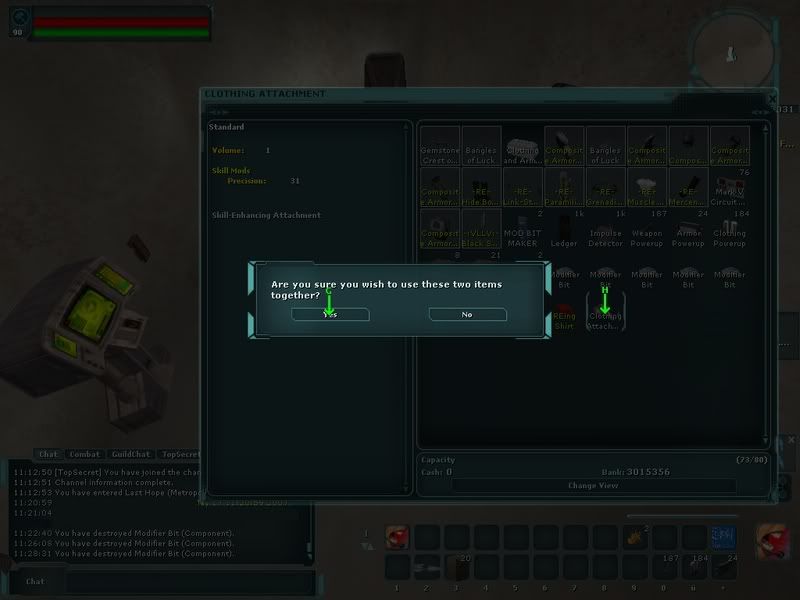
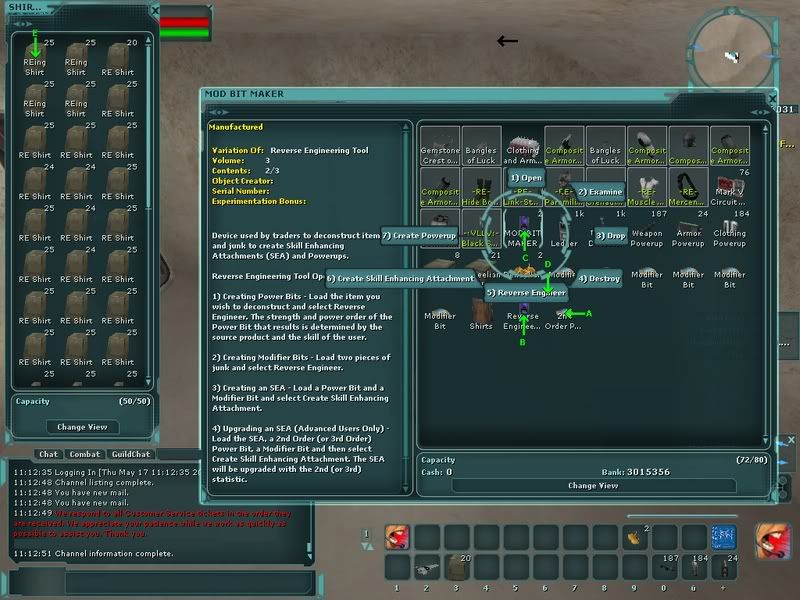
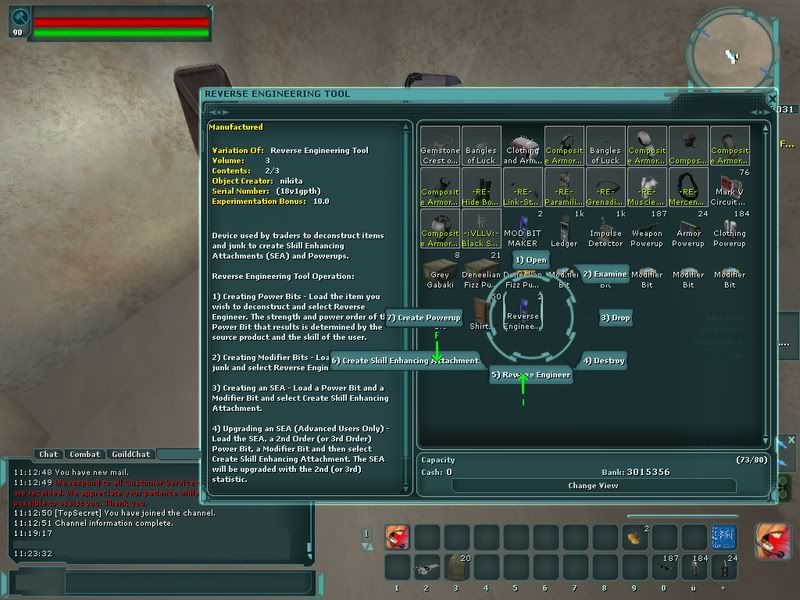
in the following screenshots you will see how your interface has to look like for REing (i added points from A to I. you will need to take screenshot and see where the points are and exchange them in the script. XA and YA for example in my screenshot are 722 and 401 (I'm using MS paint to get the coordinations but there are other ways)
Image
Image
Image

as you can see in the images you will have to have the inventory + the backpack window open for REing. and it's important that the power bit is at the last spot in the inventory. (it is better if the inventory hasnt gotten too much stuff in it).

Step III: Using Script
After you adjusted the script save it and start it. you then have 5 seconds to toggle to swg client. then it should start with grabbing the power bit into the RE tool. if you want it to stop press the escape key.


if you have problems setting this up let me know and i'll try to explain it a bit further.

Posted: July 3rd, 2007
Total Posts:221 Joined:2005
I say Yay. Don't even have to try it to know that this works. Even if you can't get it to work AFK, submitting this as a guide would work. GJ.
Posted: July 3rd, 2007
xeros
This is very nice. I've thought about doing this but have been too lazy.

Only problem with this is it can't tell when it's a 35 bit, so checking every 5 mins or so is needed.

Yay
Posted: July 3rd, 2007
User avatar
administrator
Total Posts:29917 Joined:2002
2 yays 1 more to move to confirmed
0 nays 3 more to lock this topic
Posted: July 3rd, 2007
sp592400
Yep works. /hi5 to you. I RE quite a bit and this will help alot. Thanks.
Posted: July 3rd, 2007
Total Posts:258 Joined:2007
YAY! although im not going to use it since im retired from REing ;)
Posted: July 3rd, 2007
User avatar
Total Posts:1872 Joined:2006
This works well, great post, Yay

_________________
Your Friendly Neighborhood Moderator!
Read The FAQ - http://www.taultunleashed.com/phpbb2/forum159_FAQ.html
Posted: July 4th, 2007
User avatar
administrator
Total Posts:29917 Joined:2002
Moving to confirmed
Posted: August 15th, 2007
stihlredneck
I can't get this to work - the actions are fired but not on the SWG client
I did the borderless window thing and everything yet same result
I also switch far before the 5 second period
Posted: September 3rd, 2007
User avatar
Total Posts:47 Joined:2007
They changed the naming of powerbits, so you may now see when it hits +35 without stopping.
Posted: September 10th, 2007
pldandrea
I am going to attempt to learn how to write the script. but I have an idea to make this work afk.

Lets say you have a backpack with 50 +25s. You take the script that was provided above (thx swg_exploiter) and have it run say 15 times. then it takes the bit it was working, and drops it into another backpack. then it goes to a diff backpack and pulls out another +25. rinse and repeat.

You may not get all +35s but you wouldnt have to sit there and monitor the program and swap in a new bit when it hits 35
Posted: September 11th, 2007
jackal76
Morning

If you have downloaded the full version of AutoIT V3, there is a tool included that makes finding on screen coordinates alot easier than using something like MS Paint. Hit start -> Programs -> AutoIT V3 -> AutoIT Window Info. Click the Mouse tab, and activate the SWG window. Move the cursor to where you want it to be, and the coordinates will appear next to Position in the Window Info box. If you want to explore AutoIT further, play around with some of the tools in Window Info, it is a very useful tool :)

Peace
Posted: September 11th, 2007
User avatar
Total Posts:47 Joined:2007
jackal76 wrote:Morning

If you have downloaded the full version of AutoIT V3, there is a tool included that makes finding on screen coordinates alot easier than using something like MS Paint. Hit start -> Programs -> AutoIT V3 -> AutoIT Window Info. Click the Mouse tab, and activate the SWG window. Move the cursor to where you want it to be, and the coordinates will appear next to Position in the Window Info box. If you want to explore AutoIT further, play around with some of the tools in Window Info, it is a very useful tool :)

Peace
Very useful indeed.
Posted: September 11th, 2007
User avatar
Total Posts:184 Joined:2006
pldandrea wrote:I am going to attempt to learn how to write the script. but I have an idea to make this work afk.

Lets say you have a backpack with 50 +25s. You take the script that was provided above (thx swg_exploiter) and have it run say 15 times. then it takes the bit it was working, and drops it into another backpack. then it goes to a diff backpack and pulls out another +25. rinse and repeat.

You may not get all +35s but you wouldnt have to sit there and monitor the program and swap in a new bit when it hits 35
thought about that too already. :) might work on making such a script and update the explanation when i have time..
Posted: September 19th, 2007
pldandrea
i have come up with a way to RE many bits. instead of having 1 bit in your inventory, i have 18. all you have to do is change the coordinates of where it drags the modbit, shirt, and attachment from.In my SS, where the belt is, is where autoit would drag the modbit from. I have my inventory set up like this:
Image

it ends up cycling through all the bits. You can effectively leave for an extended amount of time cause it takes a lot longer to get all the bits up.
For powerups and luck food i created a macro that fires from the toolbar i put the pause for the pups at 1805 and the other macro for my food that lasts apprx 18 minutes at 1080.

if you want to get an estimation on how long say 10 bits would take. Do the original script with 1 bit and time it. now multiply that time by 10 and you have your estimated time.

If any of this is unclear let me know
Want Advertisements After The Last Post Removed? Create A Free Account!
blue large dotWho is online
Users browsing this forum: No registered users and 13 guests
Post Reply