Here is the modified code that will do two things different then the first script.
One, it will RE each power bit a set number of times and then move it to a hold container. (you can set the number of times each bit is REed)
Two, it will run for set amount of time and then exit the script. This will prevent the making of unnecessay MOD bits and uncrating REshirts.
There are also a couple of new parts to the code that make it easier to work with. When you start the script it will automatically switch to the SWG window and pause. You must press F9 to start the sript running. You still use the Escape Key to end the script
; RE Script by swg_xploiter
; upgraded for multi bit REing by your name here
Global $Paused, $Showme, $Count = 0, $time = TimerInit()
HotKeySet("{ESC}", "Terminate")
HotKeySet("{F9}", "ShowMe"); this is new, once you start the macro you will need to press F9 to start it running
Opt("MouseClickDragDelay", 100)
WinActivate( "Star Wars Galaxies", "");this is new as well, it will activate the SWG window so now you don't need to click on it
Sleep (5000)
While 1
If TimerDiff($time) > 30000 Then Exit ;(x * 60000 = x minutes)
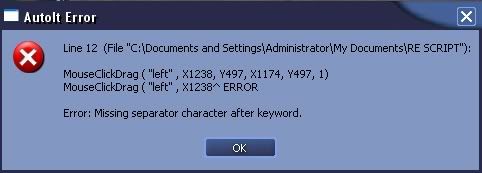
If $ShowMe And $Count *
;Power Bit Into RE tool:
MouseClickDrag ( "left" , XA, YA, XB, YB, 1) ;Enter X and Y coordinates of Point A and B
Sleep (700)
;Modifier Bit Making:
MouseClick ( "right" , XC, YC, 1 ) ;Enter X and Y coordinates of Point C
Sleep (500)
MouseClick ( "right" , XD, YD, 1 ) ;Enter X and Y coordinates of Point D
Sleep (1000)
;Modifier Bit Into RE Too:
MouseClickDrag ( "left" , XA, YA, XB, YB, 1) ;Do same thing as in line 11
Sleep (700)
;Shirt out of crate:
MouseClick ( "left" , XE, YE, 3 ) ;Enter X and Y coordinates of Point E
Sleep (500)
;Creating CA:
MouseClick ( "right" , XB, YB, 1 ) ;Enter X and Y coordinates of Point B
Sleep (500)
MouseClick ( "left" , XF, YF, 1 ) ;Enter X and Y coordinates of Point F
Sleep (1000)
;CA Onto Shirt:
MouseClickDrag ( "left" , XH, YH, XA, YA, 1) ;Enter X and Y coordinates of Point H and A
Sleep (700)
;Confirming CA Onto Shirt
MouseClick ( "left" , XG, YG, 1) ;Enter X and Y coordinates of Point G
Sleep (500)
;Shirt Into RE Too:
MouseClickDrag ( "left" , XA, YA, XB, YB, 1) ;Do same thing as in line 11
Sleep (700)
;Reverse Engineering:
MouseClick ( "right" , XB, YB, 1 ) ;Enter X and Y coordinates of Point B
Sleep (500)
MouseClick ( "left" , XI, YI, 1) ;Enter X and Y coordinates of Point I
Sleep (1000)
$Count += 1
If $Count = 10 Then
;to move the completed power bit you hold container
MouseClickDrag ( "left" , XA, YA, XJ, YJ, 3); Enter X and Y coordinates for A and J
Sleep (500)
;move new power bit to your main RE inventory
MouseClickDrag ( "left" , XK, YK, XL, YL, 3); Enter X and Y coordinates for K and L
Sleep (500)
$Count = 0;
EndIf
EndIf
Sleep(20)
WEnd
Func ShowMe()
$ShowMe = Not $ShowMe
$Count = 0
EndFunc ;==>ShowMe
Func Terminate()
Exit 0
EndFunc ;==>Terminate
The first thing you must change in this script is the RED
*, change it to read "<= 10 then" without the quotes.
OK, now setting up your time for the script to autostop. This script will RE a bit every 13 seconds and RE that bit 10 times and then move it to the hold container J. So one bit will take 130 seconds or 2 minutes 10 seconds. The script Sleep cycles work in seconds and 60,000 is equal to one minute.
An easy way to get your stop time is 130000 x bits to be REed. So 20 bits is 130000 x 20 =2600000.
So changing the red 30000 to 2600000 will RE 20 bits and exit.
You will need to change the red 10s to 20 or whatever number of bits you want to RE.
I would also put in 2 or 3 extra power bits in your to be REed box K just to make sure the script exits before you run out of bits and end up making a bunch of extra mod bits.
NOTE: you may end up REing a few times after it hits 35 or you may move an incompleted bit to your hold container before it hits 35. The MAIN purpose of this sript is to RE 40 or 50 bits as close to 35 as possible while you are AFK. Then you just run the first script on the bits that did not reach 35. Also make sure you have enough empty space in the container you want to move completed bits into or the script will fail.
You will also want to run an in game macro that will reload your RE pups and luck food.
Let me know how it works out for you. And thanks to swg_xploiter for doing the script up first.




 Who is online