Post Reply Home » Forums » Guild Wars 2 » Guild Wars 2 Bots

Logitech G15 Keyboard Scripting : Guild Wars 2 Bots

Posted: October 3rd, 2012
User avatar
Total Posts:15 Joined:2012
Before I started creating actual programs, I forged together this Logitech G15 Keyboard script.

After thinking about it, this should work for any game since all it does is press buttons.

It should be fairly simple to use. I included a How to install text file.
Right now they are setup for a ranger. The downside is that you attack constantly, but the good side is that they are all randomly generated so programatically they should be undetectable.

You can find the scripts @ http://www.mediafire.com/?meatim2zc9glcrh

Virus Scan: http://virusscan.jotti.org/en/scanresul ... 252d190766

Directions to use:

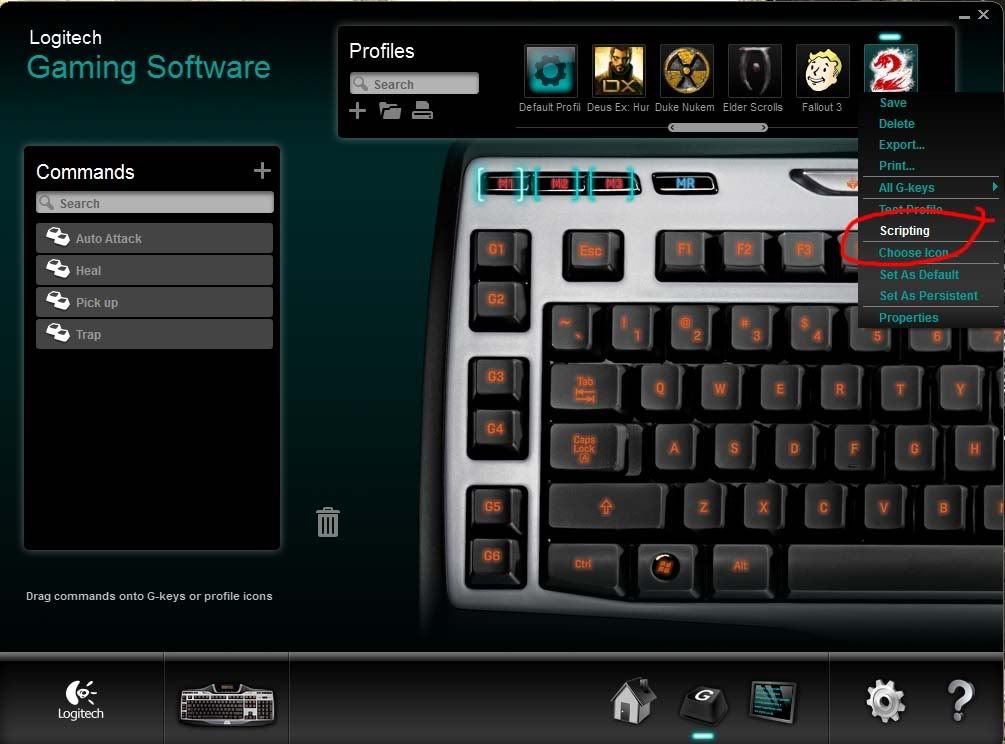
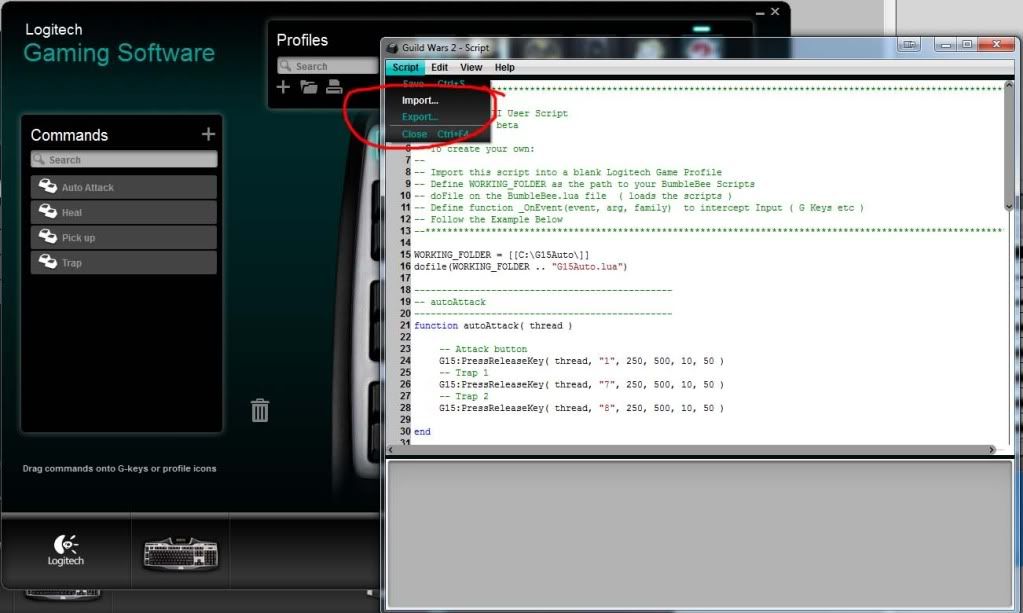
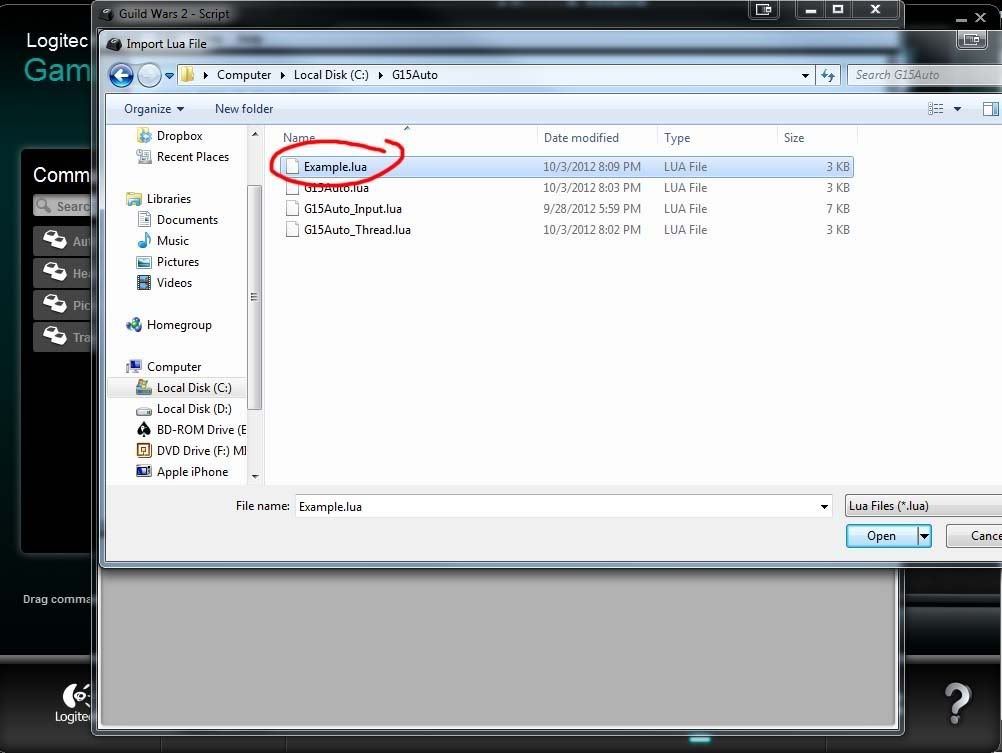
1: Copy extracted folder directly to C:\G15Auto
2: http://i1305.photobucket.com/albums/s54 ... 8c03ba.jpg
3: http://i1305.photobucket.com/albums/s54 ... 2c2c1d.jpg
4: http://i1305.photobucket.com/albums/s54 ... 7d1389.jpg
5: Change key presses to suit your auto-adventuring needs.
6: Press G6 to start auto-botting.

Let me know if you have problems.

Cheers,
Joseph


Last edited by jfareal on October 6th, 2012, 6:49 am, edited 5 times in total.
Posted: October 3rd, 2012
User avatar
Total Posts:264 Joined:2011
I've used something similar with mine you can basically Bot with just the built in componets
Posted: October 3rd, 2012
User avatar
Total Posts:15 Joined:2012
It was actually pretty fun to write. You can do some wicked stuff with these keyboards. I only have the old G15 model, but the scripts should work with all models up to G19 ( $200 keyboard... I wants )
Posted: October 4th, 2012
User avatar
administrator
Total Posts:29917 Joined:2002
Awesome. Can you add in a quick virus scan in there. Also some pictures / video of it to help noobies is really big.
Posted: October 6th, 2012
User avatar
Total Posts:15 Joined:2012
How do you do the virus scan?

Update: I figured it out, and edited original post.
Posted: October 6th, 2012
User avatar
administrator
Total Posts:29917 Joined:2002
Nice and 100 rep to you.

Also gave you a custom avatar.
Posted: October 19th, 2012
Total Posts:2 Joined:2012
Did you combine all of your attacks under the multi-key for auto attack or is it just the actual auto-attack key?

If not, could you show me what key combos and delays you used?

This is an awesome script, thanks btw.
Posted: October 23rd, 2012
User avatar
Total Posts:15 Joined:2012
injenu wrote:Did you combine all of your attacks under the multi-key for auto attack or is it just the actual auto-attack key?

If not, could you show me what key combos and delays you used?

This is an awesome script, thanks btw.
Thanks, I'm glad people are enjoying using it.

I combined all the attacks under the G6 key. I used to have them separated out to G1, G2, G3, but found that annoying to get everything going, and remember which ones were on.

There is a way to display messages on the LCD, which if you look up the Logitech Scripting PDF, you should easily be able to do this.

Posted: July 1st, 2015
Total Posts:1 Joined:2014
would this work for the logitech g105?
Want Advertisements After The Last Post Removed? Create A Free Account!
blue large dotWho is online
Users browsing this forum: No registered users and 5 guests
Post Reply